01 / CLEARKeep the box.
Keep the box.
Lose the tick.
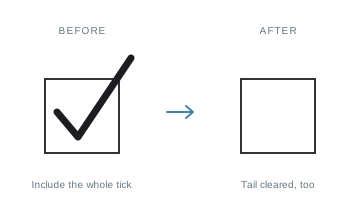
Cover a printed checkmark with white while preserving the detected box outline. Include the entire tick in your selection — even the tail outside the square.
GOBLIQ FORM FILLER
More than typing on a PDF. Clear a marked checkbox, cover an old entry with a matching background, or place one digit in each square. All on your Mac.
Download for MacApple-notarized — installation notes ↗SMALL TOOLS. BIG DIFFERENCE.
The wrong tick. Five new rows. A row of tiny boxes.
Make the changes that ordinary forms don’t allow.
Cover a printed checkmark with white while preserving the detected box outline. Include the entire tick in your selection — even the tail outside the square.
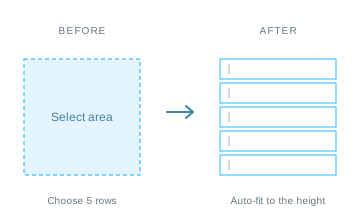
Select an area and insert five text fields at once. Their heights adjust automatically to fit the selection. Edit each row separately.
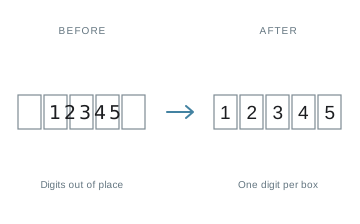
Type once. Distribute the digits into a detected row of cells. If no suitable boxes are found, your text stays unchanged.
Place text where you need it. Adjust the font, size, colour and spacing. Add several rows at once, then edit each one individually.
Insert signatures, images and checkmarks. Copy a rectangular area, duplicate it, or move several selected objects together.
Work on your Mac without uploading PDFs to a server. Save a portable project to continue later, or export a PDF for sharing.
No. You can place text and other objects over an ordinary PDF page. This is an overlay editor, not a tool for rewriting the original document text.
No. The signature tool places a visible image of a signature. It does not create a certificate-based digital signature or verify anyone’s identity.
No. White areas and copied patches cover what is underneath; they are not secure redaction. Do not use them to remove confidential information before sharing a PDF.
It turns the exported pages into colour images with a simulated scanner appearance. Text in that export is no longer selectable as the original PDF text. Keep your editable project as well.
This preview is for Apple Silicon Macs (M1 and newer). English is the default; Russian is also available. Compatibility on older macOS releases is still being checked.
Open the DMG and drag Gobliq Form Filler into Applications. Quit the previous version before replacing it.
The app is signed with an Apple Developer ID and notarized by Apple. macOS may ask you to confirm the first launch. Keep backups of important documents and review exported files before sharing them.
GOBLIQ FORM FILLER
Free for your Apple Silicon Mac.